How far have our classrooms and workspaces come in the last two decades? From dusty chalkboards to sleek, interactive displays, the tools we use today aren’t just about convenience, they’re about transforming how we connect, teach, and share.
Among these cutting-edge solutions, the HKMLC Smart Board Explorer Essential Vision 55 stands out as a powerful, intuitive option for any modern environment.
The Rise of Smart Boards in Education and Business
Before diving into the specifics of the Explorer Essential Vision 55, it is important to understand the broader context. The traditional whiteboards that replaced chalkboards were once revolutionary. They offered a cleaner and more versatile surface, but they still required manual writing and constant erasing.
Then came interactive whiteboards, often called smart boards. These displays combine the simplicity of a whiteboard with advanced digital features. Users can write with a stylus, interact with digital content, and connect the board to the internet or a computer for a truly dynamic experience.
Today, smart boards are essential in schools, universities, corporate offices, and training centers. They bring people together, improve presentations, and make learning more engaging. The HKMLC smart boards have become trusted tools for institutions worldwide, and the Explorer Essential Vision 55 is one of their flagship models.
Meet the HKMLC Smart Board Explorer Essential Vision 55
The Explorer Essential Vision 55 is designed for classrooms and professional environments that demand clear visuals, smooth interaction, and reliable connectivity. As its name suggests, this smart board has a 55-inch screen, which strikes the right balance between visibility and space-saving convenience.
This size is ideal for medium-sized classrooms, conference rooms, and meeting spaces where participants need to see details clearly but may not have room for a larger board. The sleek design also blends well with modern interiors, adding a touch of sophistication to any room.
Design and Build Quality
One of the first things people notice about the Explorer Essential Vision 55 is its sturdy yet elegant design. The frame is slim but strong, and the screen surface is made from durable materials that resist scratches and fingerprints.
Teachers and presenters appreciate that the board’s surface is easy to clean. Unlike traditional whiteboards that can stain over time, the smart surface of this model maintains its clarity even with heavy daily use.
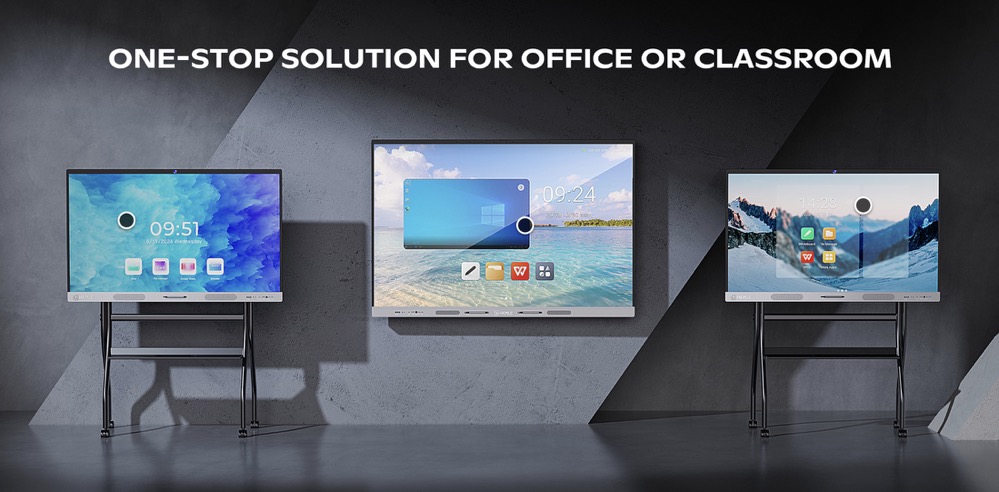
Mounting options allow the board to be installed on a wall or used with a mobile stand, which provides flexibility for spaces that need to adapt quickly.
Stunning Display and Clarity
Visual quality is one of the most critical factors for any smart board, and the Explorer Essential Vision 55 delivers crisp, vivid images that enhance every lesson or presentation. The display supports full high definition resolution, ensuring that text, images, and videos appear sharp and detailed.
Teachers can write notes, highlight key points, and draw diagrams with precision. Students at the back of the classroom can see content as clearly as those in the front row. This reduces misunderstandings and keeps everyone engaged.
For business users, the clarity makes video conferencing, charts, and collaborative planning more effective. Detailed spreadsheets, graphs, and creative visuals come to life on this screen.
Interactive Touch and Writing Experience
At the heart of any smart board is its interactive experience. The Explorer Essential Vision 55 features responsive touch technology that feels natural to use. Whether you are writing with a stylus or your fingertip, the board registers every movement with minimal lag.
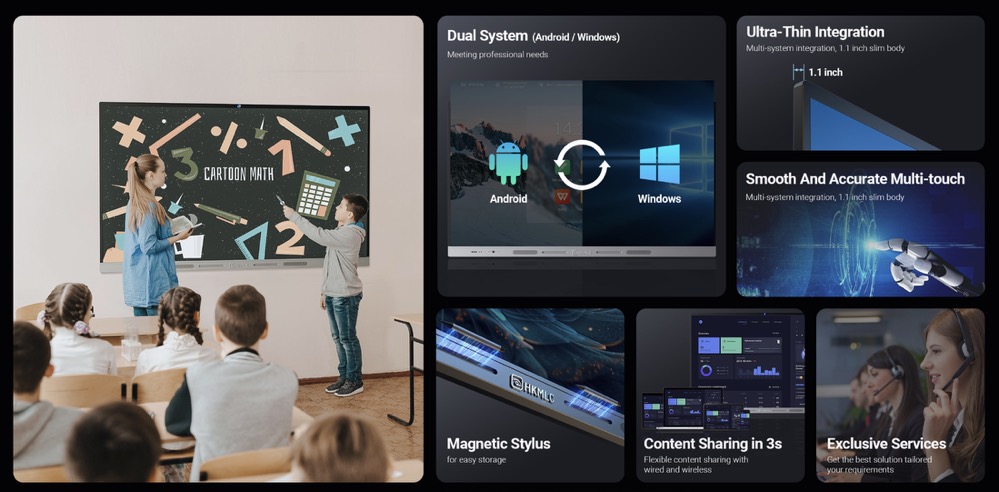
The multi-touch functionality allows several people to interact with the board at once. In classrooms, this means students can come up to the board to solve problems or answer questions together. In a corporate setting, team members can brainstorm ideas and sketch plans without waiting for their turn.
This level of interactivity transforms passive learning or presentations into engaging, hands-on sessions that encourage participation.
Powerful Software Integration
The Explorer Essential Vision 55 is not just a hardware solution; it comes with robust software support that unlocks its full potential. Teachers can use built-in apps for drawing, note taking, screen recording, and sharing content. Files can be saved instantly, so important information is never lost.
The board supports popular education platforms and office software, making it easy to integrate with existing digital resources. Teachers can open lesson plans, videos, quizzes, and web pages right from the board. There is no need to switch between devices or struggle with tangled cables.
In meetings, the board becomes a central hub for sharing ideas. Teams can connect laptops, tablets, or phones wirelessly to share screens, present slides, or collaborate on documents in real time.
Connectivity and Compatibility
Modern classrooms and offices rely on reliable connectivity, and the Explorer Essential Vision 55 is equipped with multiple options. USB ports, HDMI, wireless connections, and Bluetooth support ensure that devices can connect quickly and easily.
Wireless screen sharing allows teachers or presenters to move freely around the room without being tied to a laptop. This mobility encourages better interaction with students or colleagues.
Many users also appreciate that the board is compatible with various operating systems, including Windows, macOS, and Android. This flexibility means there are no frustrating barriers when switching between devices.
Easy Setup and User Friendly Interface
One of the major concerns people have when adopting new technology is the learning curve. Fortunately, the Explorer Essential Vision 55 is designed to be intuitive for both tech-savvy and less experienced users.
The interface is simple, with clear menus and icons that make navigation straightforward. Teachers can switch between tools with just a tap, and students can quickly learn how to use the board’s features during activities.
Installation is equally user friendly. The board can be mounted on the wall using standard brackets, or placed on a mobile stand for classrooms that need to rearrange seating or move the board between rooms.
Durability and Maintenance
When investing in technology for schools or offices, durability is crucial. The Explorer Essential Vision 55 is built to withstand daily use. The screen’s toughened glass surface resists scratches and minor impacts, while the internal components are protected by high quality casing.
Maintenance is simple. The board’s smooth surface wipes clean with a dry cloth, and the software receives regular updates to keep performance smooth and secure.
Schools and businesses appreciate this reliability because it means fewer disruptions, lower repair costs, and better long-term value.
Benefits for Teachers and Students
For teachers, the Explorer Essential Vision 55 is more than just a display. It is a powerful teaching tool that supports a wide range of instructional methods. Whether presenting slides, annotating text, or demonstrating interactive lessons, teachers can adapt quickly to the needs of their students.
Students benefit from increased engagement and collaboration. Hands-on activities, multimedia content, and real-time problem solving help keep learners interested and improve retention.
In remote or hybrid classrooms, the smart board can also connect with online platforms, so students at home can follow along and interact as if they were in the room.
Benefits for Business Users
In corporate environments, the Explorer Essential Vision 55 is equally valuable. It enhances presentations, makes brainstorming more dynamic, and simplifies team collaboration.
During meetings, multiple participants can contribute ideas, edit documents, and review visuals together. The interactive features make discussions more productive and reduce the need for printing handouts or taking separate notes.
Remote teams can benefit too. The board’s connectivity allows seamless video conferencing, screen sharing, and real-time edits, bringing distributed teams closer together.
Why Choose HKMLC Smart Boards
The popularity of HKMLC smart boards is no surprise when you consider their commitment to quality, innovation, and user satisfaction. The Explorer Essential Vision 55 demonstrates these values by combining advanced features with user-friendly design and robust support.
Many schools and companies choose this model because it strikes the right balance between performance and affordability. It delivers professional-grade features without the excessive cost that can come with other interactive boards.
Real World Success Stories
Across the globe, the Explorer Essential Vision 55 has earned praise from teachers, students, and professionals alike. Schools report higher student engagement and better lesson delivery. Teachers appreciate the ease of use and the variety of interactive tools.
Businesses find that meetings become more productive, with fewer misunderstandings and greater team participation. Creative industries use the board for design sessions, project planning, and client presentations.
These real world examples show that the smart board is more than a piece of technology. It is a bridge that connects people and ideas.
Looking Ahead: The Future of Learning and Collaboration
As technology continues to evolve, tools like the Explorer Essential Vision 55 will play a vital role in shaping the future of education and work. Hybrid learning, remote meetings, and digital collaboration are becoming standard practice.
Smart boards will continue to expand their capabilities, integrating artificial intelligence, advanced touch recognition, and cloud connectivity. This means even more opportunities to create engaging, efficient, and inspiring learning and working environments.
Investing in a smart board like the Explorer Essential Vision 55 is not just about keeping up with trends. It is about providing teachers, students, and professionals with the tools they need to succeed in a digital world.

Final Thoughts
The HKMLC Smart Board Explorer Essential Vision 55 stands as a testament to how far classroom and meeting room technology has come. With its stunning display, smooth interactivity, reliable performance, and easy integration, it is a smart choice for schools and businesses looking to make a real impact.
Whether you are a teacher aiming to inspire students, a business leader seeking better collaboration, or an IT manager upgrading your organization’s tools, the Explorer Essential Vision 55 deserves serious consideration. It brings the promise of smarter, more engaging learning and working to life—one screen at a time.