








Partitioning a Mac hard drive is a common practice to organise data, separate device operating systems, or create dedicated storage spaces. However, maintaining multiple partitions can sometimes become complex or even unnecessary. In such a case, merging your device partitions can be beneficial, especially when managing storage space or simplifying system maintenance.
If you’re a Mac user and looking for methods to merge partitions without losing data, this guide will walk you through everything you need to know. Follow these methods one by one to understand how to merge partitions on a Mac without losing data.
Understanding Partitions on Mac
A partition is a separate section of your Mac’s hard drive, which allows you to divide your device’s storage into multiple logical volumes that the system can treat individually. Generally, a partition allows you to separate personal files from system files, install multiple macOS versions, or segregate workspaces.
When to Merge Partitions on Mac?
Merging Mac partitions is not always required; there are some specific situations when you can merge partitions. This includes:
- Reclaim Unused Space: If your partition is running out of space while another one has a lot of unused space, merging them can redistribute the space more effectively.
- Improve Performance: Merging partitions on your Mac allows you to run it more efficiently as on fewer partitions because fewer partitions reduce drive fragmentation, allowing macOS to access data faster.
- Reversing Past Decisions: If you’ve previously created partitions for dual-booting Windows or Linux and now those setups are no longer required, then merging can help to reclaim the unused space.
- Preparation for macOS Updates: Some major macOS updates need significant free space. Merging partitions combines smaller sections into one larger volume, ensuring smooth updates.
Important Points Before Merging Partitions
Merging partitions may look simple, but if done incorrectly, it can lead to serious issues and potential data loss. Here are some important points that you can consider before proceeding with the partition merge process:
- Backup Your Data: Create backups of your important data using the built-in Time Machine backup utility, cloud backups such as iCloud, or any third-party backup tool.
- File System Compatibility: If the macOS partitions you want to merge use different file systems (APFS vs. HFS+), one must be reformatted—risking data loss without a backup.
- Free Space Requirements: The partition you want to keep must have sufficient space to hold all the data from the partition being deleted.
- Know the Limitations: Apple’s built-in tools allow partition merging only under certain conditions. If those conditions are not fulfilled, you may need third-party software.
Quick Methods to Merge Partitions on Mac
Now that you understand the reasons for merging Mac partitions and the precautions to take beforehand, let’s explore how to merge them without losing data. You can apply any of the following methods to merge partitions on Mac:
Method 01: Merge Partitions Using Disk Utility
Mac’s built-in Disk Utility tool allows you to create, delete, resize, and merge partitions on your device. To merge partitions via Disk Utility, you have to:
- Go to Applications > Utilities, then launch Disk Utility.
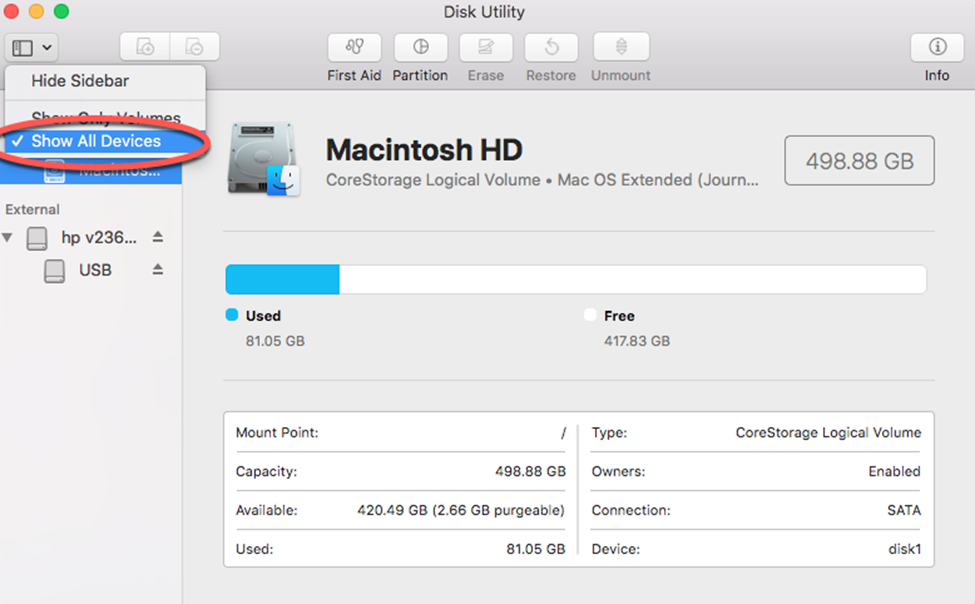
- From the Disk Utility window, click View > Show All Devices from the top menu.
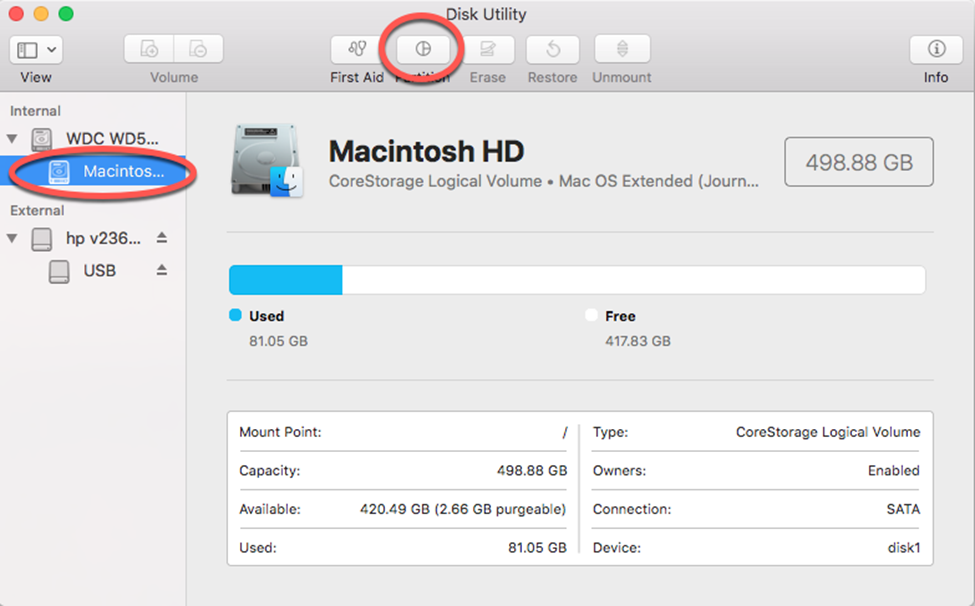
- Now select your disk (not just the volume) from the left pane.
- Click the Partition button in the toolbar.
- Select the partition you want to delete or merge into another, then click the – (minus) button.
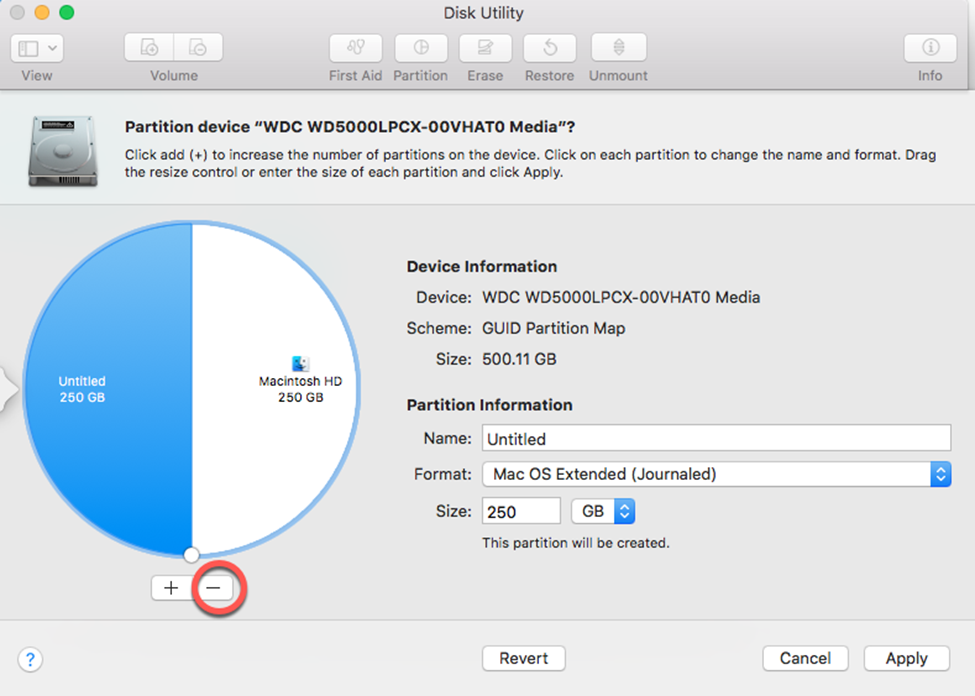
- This will automatically add the space from the deleted partition to the remaining one.
- Lastly, click Apply to confirm the changes.
- Once finished, check that your data in the surviving partition is intact.
Method 02: Merge Partitions Using Third-Party Software
If Disk Utility fails to meet your needs or the aforementioned steps seem complex, third-party partition management tools are a better option. There are several applications, such as Paragon Hard Disk Manager, iBoysoft NTFS for Mac, and GParted, available online that you can try for non-destructive merging and resizing without reformatting.
It’s essential to evaluate these tools thoroughly by reviewing their features before use. Here are general steps that you need to follow to merge partitions on Mac using third-party tools:
- Firstly, download and install a reliable partition manager tool on your Mac.
- Launch the software and give all the required permissions to manage disk operations.
- Now, select the partition you want to merge. You need to choose:
- Source Partition (to be removed)
- Destination Partition (to keep data)
- Wait till the software combines both partitions without formatting.
- Once merging is complete, check all files to ensure nothing is missing.
What if Data Loss Occurs While Merging Partitions on Mac?
Even with careful planning, instances may occur when your data gets lost or deleted while merging partitions on a Mac. Usually, such instances happen due to sudden power interruptions, disk errors, or incompatible file systems. If you ever find any file missing from your Mac after merging its partitions, the very first step is to immediately stop using the affected partition. Continuous usage may overwrite the lost data and make recovery complex.
One of the most reliable free Mac data recovery software that you can try to recover your lost files is Stellar Data Recovery Free for Mac. This software lets you safely recover files that have been lost, deleted, or accidentally formatted from Mac partitions. You can use this tool to restore lost photos, videos, documents, and other types of files. The free version allows restoring 1 GB of Mac data for free. To restore larger amounts, an upgrade to the paid version is required.
To recover lost files after merging partitions using the Stellar Data Recovery Free for Mac tool, you have to follow the below steps:
Step 1: Visit the Stellar Data Recovery Free for Mac official website and download the software on your device. Install it on a different drive to avoid overwriting lost data.
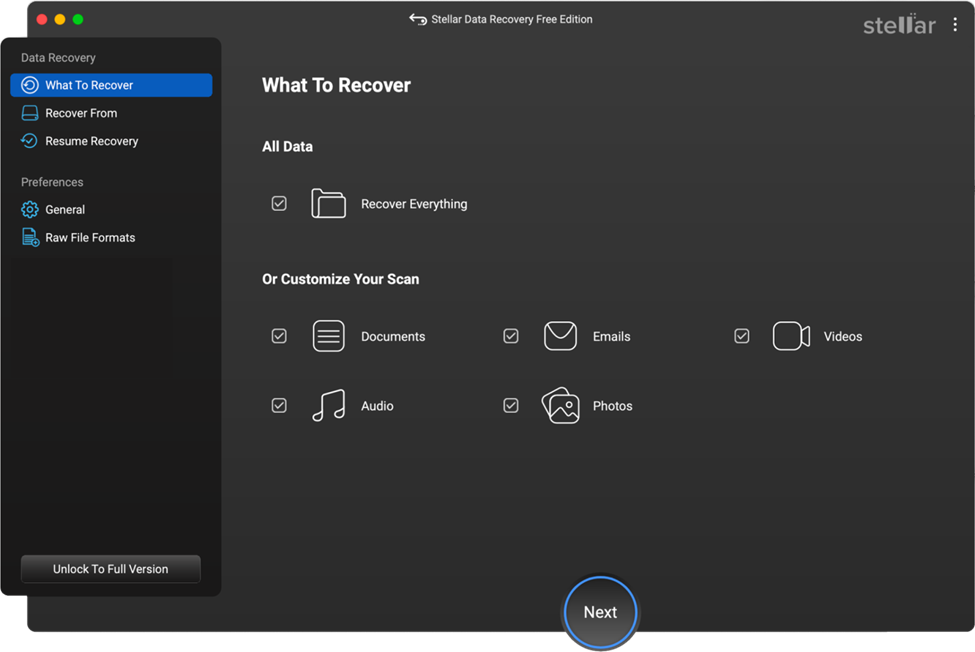
Step 2: Launch the software and from the homepage, select the types of files you need to recover and click Next.
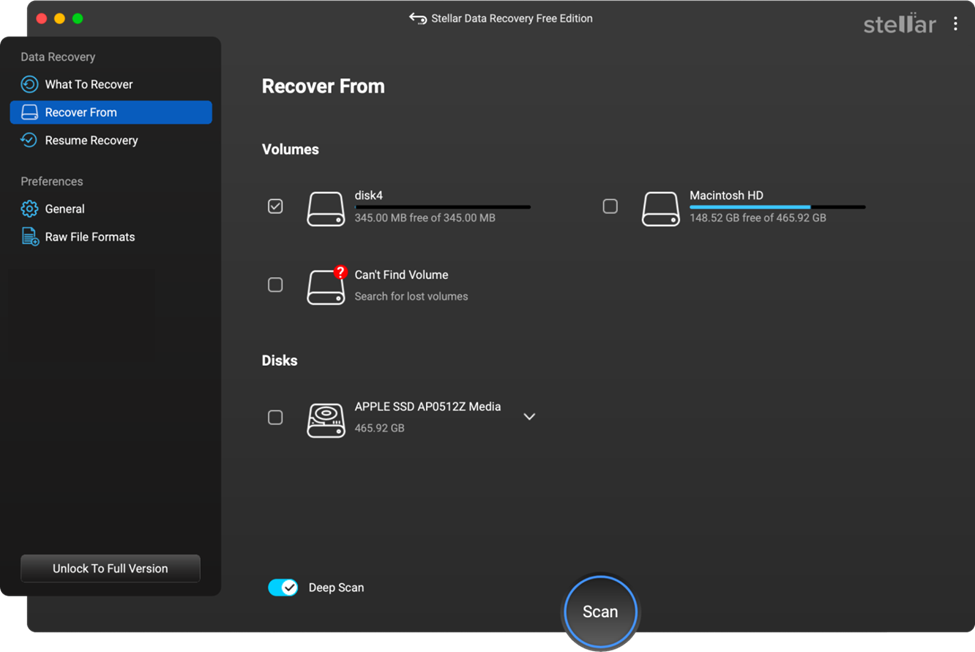
Step 3: Now, choose the partition from where the files were lost during the merge and click Scan to begin searching for lost or deleted files.
Step 4: Once the scan completes, preview the recoverable files to ensure they are intact and select the one you need to restore. Click Recover to save the selected file to a different drive or partition.

Conclusion
Merging partitions on a Mac can free up space, simplify storage management, and improve system efficiency. Hope the aforementioned methods help you merge partitions on Mac. No matter which method you choose, remember that data safety comes first. However, if you encounter data loss on your Mac while merging its partitions, use a reliable free Mac data recovery software tool like Stellar Data Recovery Free for Mac to restore your lost files. Regular backups combined with reliable recovery software ensure that your data remains protected, giving you peace of mind while managing your Mac storage.